Graphic Design and Photo Editing for Content Creators
Creating eye-catching thumbnails, professional-looking social media posts, attractive posters, and engaging promotional graphics can be challenging when you do not have access to expensive design software or advanced editing skills. For YouTubers, freelancers, digital marketers, and small business owners, producing quality visuals quickly is an important part of growing an online presence.
PixelLab Pro is a graphic design and text-editing solution for users who want to create attractive visual content with greater flexibility. It is particularly useful for designing text-based graphics, promotional artwork, YouTube thumbnails, banners, logos, and social media creatives using a mobile-friendly workflow.
Whether you are starting your first design project or already create digital content regularly, PixelLab can help you combine text, images, shapes, colors, and visual effects to bring your ideas to life.
At Prime Loom Host, you can explore our PixelLab Pro subscription offer and find out whether it suits your creative requirements. Before ordering, review the included access type, compatibility, validity, and delivery details so you know exactly what you are purchasing.
PixelLab Pro Highlights
PixelLab Pro Highlights
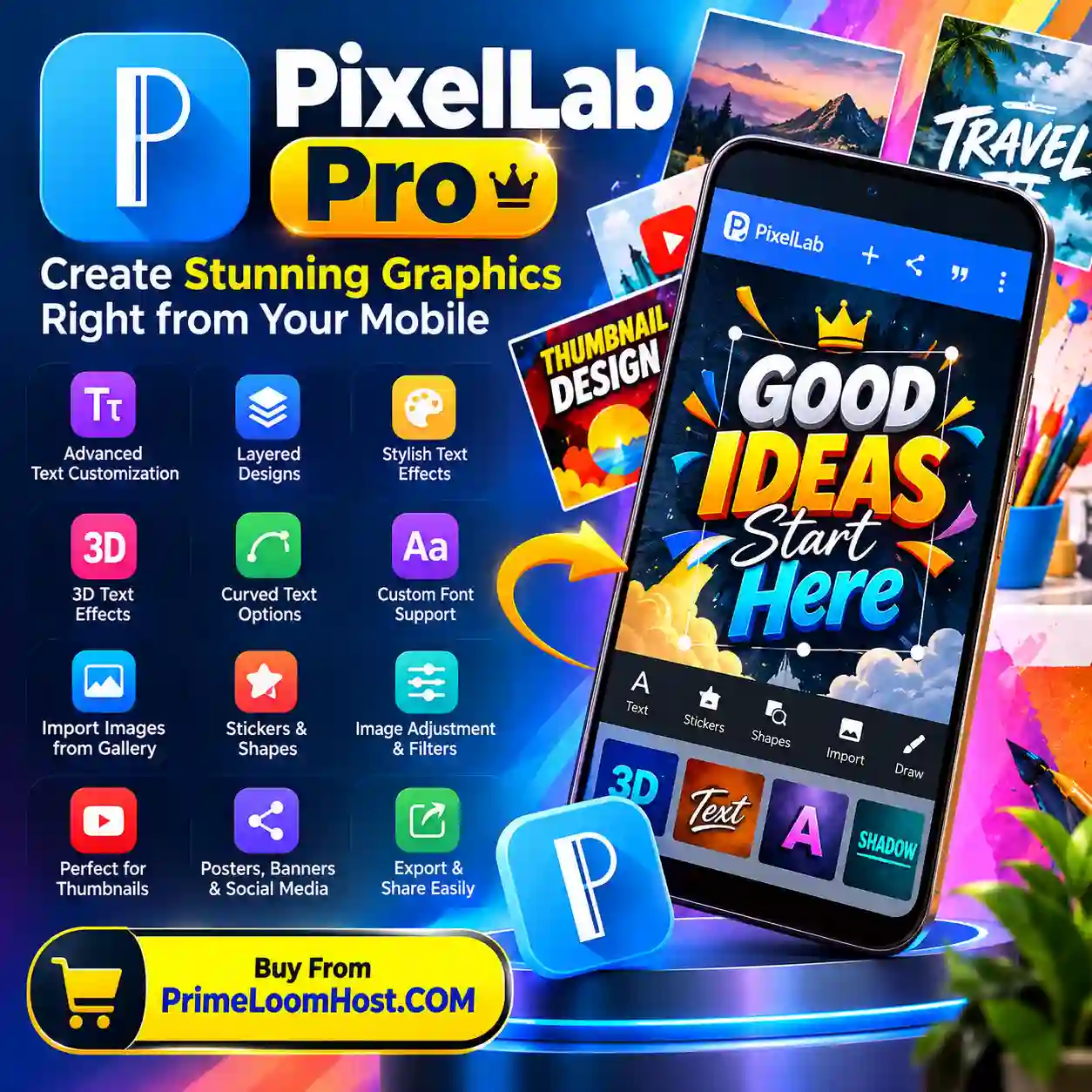
- Text customization for creative graphic design
- Multiple text elements and layered compositions
- Text styling with outlines, shadows, colors, and gradients
- 3D-style text effects where supported
- Curved text and decorative typography options where available
- Custom font import support in compatible versions
- Image importing from your device gallery
- Stickers, shapes, and other design elements
- Image adjustments such as brightness, contrast, and saturation
- Filters and visual effects
- Design creation for YouTube thumbnails and social media posts
- Useful for posters, banners, flyers, and promotional graphics
- Image export and sharing options
- A practical option for creators who prefer designing on mobile devices
Feature availability can vary by app version, device, and the particular subscription or edition offered. Confirm the exact included features before purchasing.
What Is PixelLab Pro?
PixelLab is a mobile graphic design and text-editing application associated with the creation of images containing customized typography, decorative effects, shapes, and imported photographs. It is commonly used for text-based graphics, social media designs, thumbnails, and other visual projects.
The term PixelLab Pro may be used by sellers to describe a premium offering or a particular access arrangement. However, the name alone does not establish whether a product is an official paid subscription, an application upgrade, or a modified version.
For this reason, customers should check the precise product description and delivery method before ordering. Prime Loom Host aims to help customers understand the product they are purchasing rather than relying on unclear feature claims.
Create Eye-Catching Designs Without a Complicated Workflow
Not every design project requires a desktop computer or a professional editing suite. Sometimes you simply need an attractive thumbnail, a promotional image, a product announcement, or a social media graphic that communicates your message clearly.
PixelLab offers a convenient approach to creating these types of visuals. You can arrange text, select colors, add images, experiment with effects, and adjust the composition to suit your intended audience.
For example, a YouTuber can create a bold thumbnail with a clear headline. A small business owner can design a promotional post featuring a product image and price. A freelancer can prepare a visual concept for a client without beginning every project from scratch.
The result depends on your design choices, source images, typography, and the tools available in your version of the application.
Key Features and Their Practical Benefits
1. Advanced Text Customization
Text is often the most important element of a thumbnail, advertisement, or promotional graphic. If the headline is difficult to read, viewers may scroll past your content without understanding its message.
PixelLab provides text customization options that help you adjust the appearance of your words. Depending on the version, you can change text color, size, alignment, spacing, and decorative styling.
These controls are useful for creating strong headlines, highlighting important information, and establishing a consistent visual identity.
2. Multiple Text Layers
Using multiple text elements allows you to organize information more effectively.
You might use one text element for the main headline, another for a subtitle, and a third for a call to action. Different sizes and colors can establish a visual hierarchy so viewers understand the most important message first.
This is especially useful for YouTube thumbnails, sale announcements, event posters, and digital advertisements.
3. Gradient, Stroke, Shadow, and 3D-Style Effects
Typography can look flat when it uses only a single color and a basic font. Decorative text effects can help important words stand out against photographs or colorful backgrounds.
Depending on the available tools, PixelLab can support effects such as gradients, outlines, shadows, and three-dimensional text styling.
Use these effects carefully. A clear headline with good contrast is often more effective than text overloaded with decorative elements.
4. Curved Text and Creative Typography
Some designs require text to follow a particular visual direction rather than appearing in a straight line.
Curved text and other typography effects can be useful for badges, decorative logos, labels, circular compositions, and creative promotional graphics where the relevant tools are available.
Experiment with font style and spacing to keep the finished design readable, especially on smaller mobile screens.
5. Custom Font Support
Typography plays an important role in branding. Different fonts communicate different moods, from modern and minimal to bold and energetic.
Compatible PixelLab versions may allow users to import custom fonts. This can help you maintain a consistent style across thumbnails, promotional posts, and brand materials.
Before importing a font, check its licence and confirm that your intended personal or commercial use is permitted.
6. Images, Shapes, and Stickers
Combining photographs with text and graphic elements can make a design more informative and visually engaging.
You can use imported images, shapes, stickers, and other available elements to build compositions around a particular topic. For example, an online seller might combine a product photograph with a promotional headline, while a content creator might use a subject image and contrasting background to build a thumbnail.
Choose visual elements that support the message instead of adding unnecessary decoration.
7. Basic Image Adjustments and Effects
Brightness, contrast, saturation, filters, and similar adjustments can help improve the appearance of an image.
These controls can be useful when a photograph looks too dark, its colors appear dull, or the background needs to work better with the foreground text.
The available adjustment tools depend on the installed application version. For more advanced photo manipulation, a dedicated image editor may still be necessary.
8. Export and Share Your Designs
Once a design is complete, you will usually want to save it for publishing, send it to a client, or reuse it in another project.
PixelLab supports saving and sharing created designs through the options available in the application. The supported formats, resolution settings, and export controls may vary by version.
For professional use, check the final image dimensions and file quality before publishing. Saving a design at the correct resolution helps prevent unnecessary blurring or cropping.
What Can You Create with PixelLab Pro
What Can You Create with PixelLab Pro?
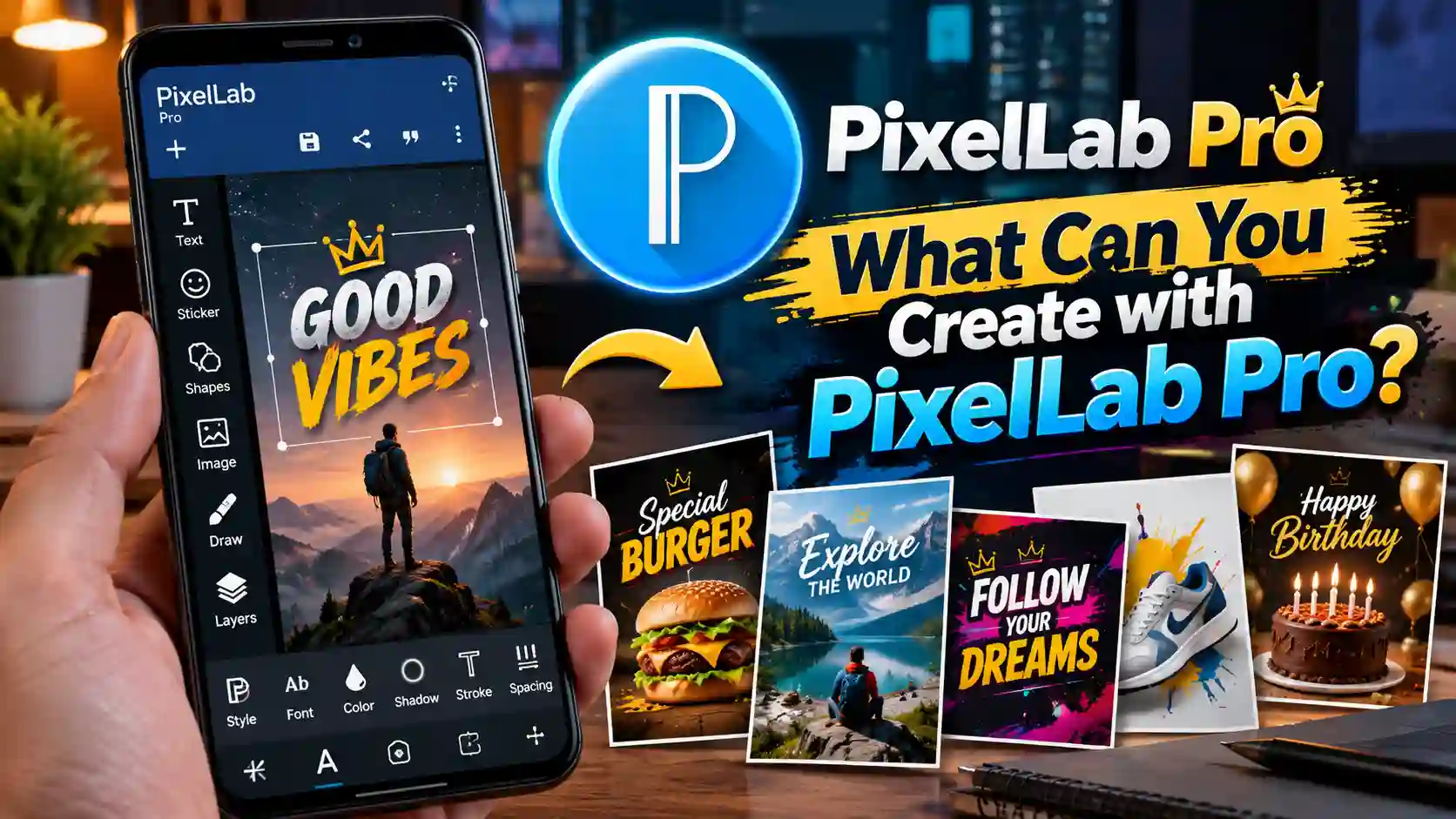
YouTube Thumbnails
Create attention-grabbing thumbnail concepts using readable headlines, subject images, contrasting colors, and carefully arranged visual elements. A clear thumbnail can help viewers understand what a video is about before clicking.
Facebook and Instagram Graphics
Design promotional posts, announcements, quote graphics, and branded social media images. Consistent typography and colors can make your content easier for audiences to recognize.
TikTok and Short-Form Content Graphics
Prepare cover images, title graphics, and supporting visual assets for short-form content. Check the target platform’s dimensions to avoid cropping important text.
Posters, Flyers, and Banners
Create graphics for sales, events, business announcements, online campaigns, and community promotions. Use a clear headline, relevant imagery, and concise supporting information.
Logo Concepts and Branding Materials
Experiment with typography, shapes, and visual arrangements to develop simple logo concepts and branding ideas.
For a business that requires a distinctive, scalable, production-ready logo, professional vector design software may be more appropriate for the final artwork.
Product Promotions for Online Stores
Online sellers can create promotional images featuring product photographs, prices, offers, and calls to action. Keep the product visible and the offer easy to understand.
Freelance Design Projects
Freelancers can use mobile design tools to prepare draft concepts, social media graphics, and simple promotional assets for clients. Always agree on the required dimensions, file formats, revisions, and usage rights before delivering paid work.
Who Should Consider PixelLab Pro?
PixelLab may be worth considering if you regularly create visual content and prefer a straightforward mobile design workflow.
YouTubers and video creators: For thumbnails, title graphics, and promotional images.
Social media managers: For creating a steady supply of posts and campaign visuals.
Digital marketers: For testing creative directions and preparing promotional artwork.
Freelancers: For simple client projects and visual concepts.
Small business owners: For product announcements, sale graphics, and branded social media content.
Students and beginners: For learning basic visual composition and experimenting with text-based designs.
The right choice depends on your workflow. If you primarily need text-based graphics and social media artwork, PixelLab may suit your requirements. If your work depends on complex vector illustrations, advanced compositing, or professional print production, you may need additional software.
Why Consider PixelLab Pro from Prime Loom Host?
Choosing a digital product should involve more than comparing names or promotional claims. Customers should understand what they receive, how access is provided, and what support is available.
Prime Loom Host presents digital products with a focus on helping customers make informed purchasing decisions.
Before placing your order for PixelLab Pro, check these important details:
- Access type: Confirm whether the offer provides an official subscription, a premium upgrade, or another form of access.
- Compatibility: Check whether the product works with your Android device or intended platform.
- Included features: Review which premium features are actually included.
- Delivery method: Understand how the product or access instructions will be provided.
- Validity: Check the subscription duration, if applicable.
- Support and warranty: Review the terms stated on the product page.
These details help reduce confusion and ensure the product matches your expectations.
Important Information Before Purchasing
PixelLab features and access arrangements can vary depending on the version and the seller’s offer. Do not assume that every product advertised as PixelLab Pro includes the same functionality.
If the listing describes a subscription, verify its duration and renewal terms. If it describes an application or upgrade, confirm the installation requirements and compatibility.
For security, avoid sharing your Google account password or verification codes with a seller. Use official account and installation procedures wherever possible.
Also consider the licensing requirements for fonts, photographs, icons, and other assets used in commercial designs. Having access to a design application does not automatically grant permission to use every asset commercially.
Frequently Asked Questions
What is PixelLab Pro used for?
PixelLab is used for mobile graphic design, text styling, thumbnails, social media posts, posters, banners, and other visual content. Available capabilities depend on the application version.
Can I create YouTube thumbnails with PixelLab?
Yes. PixelLab is commonly used to create text-based thumbnails and promotional graphics. You can arrange text and images to produce a design that suits your video’s topic.
Is PixelLab suitable for beginners?
Its text-focused design workflow can be approachable for beginners. However, the quality of the final design still depends on practice, typography, composition, and color selection.
Can I import custom fonts?
Compatible versions may support custom font imports. Check your installed version’s functionality before purchasing a product specifically for this feature.
Can I create logos with PixelLab?
You can experiment with text-based logo concepts and simple graphic arrangements. For complex vector logos or production-ready brand assets, a dedicated vector editor may be more suitable.
Is PixelLab Pro a subscription or an application?
The name can refer to different types of offers. Check the exact listing from Prime Loom Host to determine whether the product is an official subscription, an upgrade, or another access arrangement.
Does PixelLab Pro work on every device?
Compatibility depends on the application version, operating system, device specifications, and delivery method. Verify these details before ordering.
Can I use PixelLab designs commercially?
Commercial use depends on the rights associated with the application, fonts, images, and other assets you use. Review the relevant licences before publishing work for clients or businesses.
Is this a physical product?
PixelLab Pro is generally offered as a digital product or digital access arrangement rather than a physical item. Check the listing for the exact delivery method.
Final Verdict
If you regularly create YouTube thumbnails, social media graphics, promotional posts, posters, or text-based designs, PixelLab can be a useful addition to your creative workflow.
Its combination of text styling, image importing, graphic elements, and visual effects makes it suitable for many everyday design tasks. It can be particularly practical for creators who want to work on a mobile device rather than rely entirely on desktop software.
Before purchasing, make sure the specific PixelLab Pro offer includes the access type and features you need.
Explore the PixelLab Pro offer at Prime Loom Host and review the product details to determine whether it is the right fit for your design projects.
Related products
Canva Pro Subscriptions
Price range: 30৳ through 100৳
Capcut Pro Subscription
Price range: 450৳ through 580৳