Image To Text Converter Premium is a top-notch AI OCR scanner for Android devices.Image To Text Converter Premium is one of the best AI OCR scanner for Android.
Convert images, screenshots, scanned documents and printed notes into text without having to type all of it out yourself. Available on Android devices, Image To Text Converter Premium can help you convert images to text, edit it and save time on daily activities with the help of AI powered OCR (Optical Character Recognition).
It can be used by students taking notes, office staff managing documents, or anyone dealing with receipts and paperwork in a business environment, to speed up and simplify text extraction. Prime Loom Host’s digital subscription comes to you within 10 minutes of placing your order and your payment is confirmed.
Key Features at a Glance
Convert Printed Text from Pictures, Screenshots, and Scanned Documents: Printed Text to Text.
AI-Powered OCR Scanner: Accurately recognize text from a source image that is clear and readable.
Bulk Image Processing: Process several images in a single workflow, minimizing repetitive tasks.
PDF Text Extraction: Extract text from supported PDF documents and scanned files.
110+ Languages Supported: Process text in a variety of supported languages.
Copy, Edit and Share: Extract text and copy, edit and save the extracted text as either a TXT or PDF file.
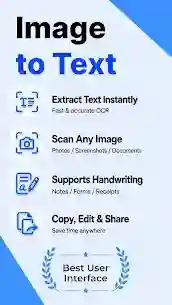
Quickly turn images into editing text
When you have to type the information from a picture, textbook, receipt or handwritten note, it takes valuable time. You can use your Android device to scan images that support the features of the image to text converter and get back the text that you can recognize and scan.
You can upload a picture and have the OCR scanner read the text for you, rather than typing a copy of the entire document. The extracted text can then be viewed and edited as required and copied into your notes, documents, or other applications.
OCR scanner for everyday tasks in practice.
For Students
Copy and paste from a textbook page, print study materials, lecture slide, and screenshots. Create study notes, organize information and capture key paragraphs more effectively with the result.
For Office and Business Users
Scan documents, receipts, reports and other paperwork. Note down any information taken from the copy in your working documents and minimise manual data entry.
To Content Creators and Researchers.To Content Creators and Researchers.
Convert on-screen text from screenshots and reference images into editable text for research, planning and personal task management. Before using or sharing extracted text in critical documents, always check the material.
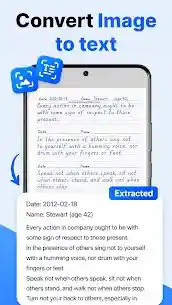
Enhanced OCR Reader with Multiple Language Support
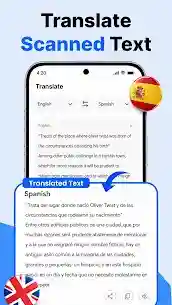
It features a built-in OCR reader which can automatically recognize printed text from supported images and documents. Language support advertised exceeds 110 languages, and is useful when working with language and document types other than English.
OCR accuracy is influenced by the quality of the image, the clarity of the font, lighting, the document layout, and language recognition. Ideally, have sharp pictures and text that is easy to read, and review for spelling, numbers, punctuation, and formatting mistakes.
Convert a bulk of images to text
Manually processing images one-by-one can be repetitive if there are multiple pages or screenshots that need to be processed. Bulk processing feature is designed to work with several images in a single workflow, supported.
It might be helpful if you’re organizing your study notes, converting scanned documents into digital format, or analyzing a series of screenshots. Check the outcome post processing to make sure significant information has been properly recorded.
Extract Text from PDFs
Some PDF documents have selectable text, others are scanned images of pages. Use an OCR reader to read the text from recognized scanned documents and work with them in a digital format.
Image To Text Converter Premium can make document digitization easier with its advertised PDF text extraction feature. File compatibility and results may vary with the PDF format and quality of the pages.
Make use of the Edit, Copy, Save and Share with ease options.
It is not enough to just extract the text. You might also want to use it again in another application, share it with someone else or save it for later.
This converter provides easy copy, edit and sharing of extracted text. Supported results can also be saved as a TXT or PDF file which will facilitate the organization of your digital documents.
Android Compatibility and Fast Digital Delivery
Important: This premium subscription is only for the Android OS devices. Please make sure your device is compatible and current for purchase before using the application.
Ordering on Prime Loom Host means that your file is delivered to you digitally within 10 minutes after you have ordered and paid. Time to delivery may be affected by order details and/or information to complete activation.
What Makes Image To Text Converter Premium from Prime Loom Host Special?
When regularly working with photos, scanned documents, screenshots or printed text, an OCR tool can save time and facilitate re-using information.
In this subscription, you’ll get image-to-text conversion, PDF text extraction, bulk processing, multilingual recognition, and convenient export support all within an Android solution.
To make it easier to process your text, and save time from typing text information, you should choose Prime Loom Host’s Image To Text Converter Premium.
Frequently Asked Questions
What is Image To Text Converter Premium?
A top class premium OCR conversion that supports the extraction of readable text from images, screen shots and documents.
Does it have an iPhone or iPad version?
This offer is only available for Android OS. The product is not compatible with iOS.
What’s the delivery time?
Digital delivery will be made within 10 minutes from after ordering and confirming payment, depending on the information needed for completing the order.
Does it have multiple language support?
Yes. It is claimed to have over 110 languages supported. Recognition might vary depending on language and image quality.
Do you have a tool that converts PDF to text?
The product promises to extract text from PDF from supported files, including scanned files. Compatibility will vary based on file format and document quality.
Can I edit the extracted text?
Yes. It provides the features of copying, editing and sharing of extracted text, and saving the results in TXT or PDF format.
Do you get 100% accuracy with OCR?
There is no OCR tool that will achieve 100% accuracy for every image. With good images, it results in better recognition, and extracted text, it should be checked before its most important use.
Get the new Image To Text Converter Premium today
Document scanning is no longer a hassle with an OCR scanner that is user-friendly for most Android users. Prime Loom Host’s Order Image To Text Converter Premium: You will get your digital subscription within 10 minutes after you have finished payment.
Related products
DramaBox Premium – Best Short Drama App
Price range: 280৳ through 1,480৳
Google Gemini AI Pro
Price range: 380৳ through 2,280৳